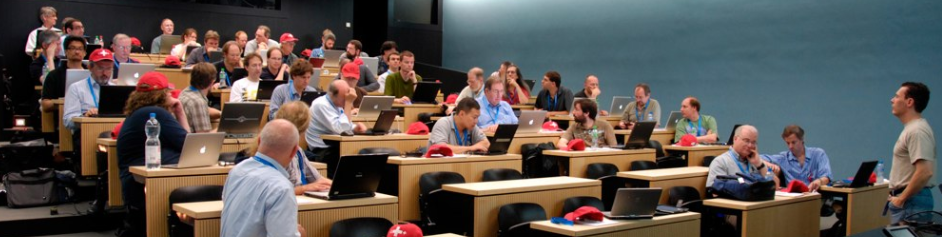
Public registration is now open for the overflow “Encore” showing of C++ and Beyond. The deadline for early-bird discount registration is November 14, but if you want to make sure you get a place it would probably be good to register sooner (the first showing sold out during the early-bird period).
If you weren’t able to get into the first one before it sold out, here is a second chance to attend the same event with the same speakers; the same location; and the same solid technical program on C++ and directly related technologies, including many new and up-to-the-minute-current talks that have never before been presented publicly anywhere else. The only thing that’s different is the date: C++ and Beyond Encore runs from December 13 (evening) through 16, 2010.
Technical Program
The talk schedule with titles and speakers is available at the Location and Schedulepage. The topics are designed to provide a balance of useful and pragmatic material, ranging from broadly applicable design techniques to hard-core deep dives on specific important language features. The program includes substantial coverage of:
C++0x features and impact: In-depth discussion of move semantics (Scott) and lambdas (me) take up most of day 1.
High performance: Hardware performance issues and techniques in Scott’s “CPU Caches” talk on day 2, and then a double-barreled hit on day 3 with Andrei’s “CAS” talk on high performance concurrency and his “Super Size Me” talk on scalability-focused issues.
Effective design: On day 2 Andrei has lots to say revisiting “Containers and Iterators,” and I’ll be launching day 3 with “Elements of Design” focused on design lessons learned in many domains but all useful today in your production C++ code.
Three panels: The first and last are dedicated to answer your questions, submitted in advance and live at the event. The second promises to be an interesting and informative “cage match” where each of the speakers will choose two or three issues that they feel strongly about, but that are potentially controversial and bound to lead to lots of instructive discussion and debate about ideal designs and pragmatic tradeoffs.
We look forward to seeing many of you in the beautiful Pacific Northwest later this year!
Watch the C++ and Beyondsite and RSS feed for further announcements, including detailed talk abstracts to be posted soon.
Updated 10/22 to remove the deferred GotW-0x talk.
Demand for C++ and Beyond has been exceptionally strong, and so Scott,Andrei and I have got together and scheduled a second “encore” event on December 13-16. It will be identical to the October event: same format, same talks, same location, just making the event available to a new set of 60 people who weren’t able to get into the first one.
See the C&B Encore announcement for details. Registration for C&B Encore will go live soon, as will the finalized list of talks each of us will be presenting. Watch the C++ and Beyond site and RSS feed for announcements.
The new UI removes most of the junk from the UI. Kind of interesting how web browsers have evolved to expose fewer UI elements. Most apps go the other way over time.
Of course, that’s because the page/site is the real app. And like most apps they are indeed going the other way.
The browser is not really an app; it’s a shell, like the OS shell, just a runtime necessity to run the real app and provide some convenience housekeeping tools. Shells generally try to remove clutter (though admittedly this goes in waves) because they know they’re not the main attraction.
The summer 2010 ISO C++ meeting was held on August 2-7 in Rapperswil, Switzerland. The post-meeting mailing is now live, including meeting minutes and other information.
In March (trip report), we voted the last set of feature changes into a Final Committee Draft (FCD) and, after two weeks of scurrying to apply the changes, the result was balloted among ISO national bodies from Mar 27 through Jul 27. That means we received the ballot results and ~250 pages of comments just in time for the start of this meeting, and have busied ourselves with starting to process them.
Where are we in the process?
For this and the next couple of meetings (Batavia IL in November, and Madrid in March), the committee is doing ballot resolution and dealing with national body comments. Because we issued a Final Committee Draft, ISO C++0x can officially no longer add new features. All that we can do is address national body comments, and make any other bug fixes we find.
The good news is that comment volume and content is considerably lighter than the comments on the CD ballot, and we expect to be able to finish handling all of them in two more meetings and, barring any surprises, vote on the Final Draft International Standard (FDIS) for C++0x standard after the Madrid meeting in March. If that happens and that ballot succeeds, the C++0x standard will be published in 2011 and we can start truthfully calling it C++11 and stop pretending about the ‘0’.
Low probability contingency: If between now and Madrid something unforeseen arises and we feel the standard is not in good enough shape to ship and needs more work, the fallback route would be to instead issue a second Final Committee Draft (FCD), which adds another comment cycle and another year to the overall process. We hope that won’t be necessary.
What did we do at this meeting?
In Rapperswil, the Core, Library, and Concurrency subgroups spent the week triaging the comments and beginning to resolve the biggest or most potentially controversial questions first.
We accomplished a lot. Here are the key decisions, some of them tentative:
Attributes: alignment, noreturn, and virtual control. My biggest (but not only) beef with C++0x [[attributes]] is that the standard itself was abusing attributes as disguised [[keywords]]. Attributes are acceptable as pure annotations, but they should have no semantic effect on the program. The problem was that some C++0x attributes did have such an effect, notably the virtual control attributes, so I’ll start with those.
My personal hot button for this meeting was that C++0x not look like the following example, which is taken almost verbatim out of the FCD ballot draft. The semantics are excellent and desirable, but the syntax is clearly not what anyone would design in a fresh programming language:
class [[base_check]] Derived : public Base {
public:
  virtual void f [[override]] ();
  virtual double g [[final]] ( int );
  virtual void h [[hiding]] ();
};
The road to the above was paved with good intentions. But it’s a clear example of adding language keywords dressed in attributes’ clothing, and not something I want to be responsible for forcing three million C++ developers to live with until the end of time.
Fortunately, the committee has tentatively agreed and decided to pursue replacing these attributes with keywords. For the next meeting, I and several other experts volunteered to write a concrete change proposal paper on this, and will include a description of two categories of options:
fully reserved words, which can break existing user code that uses the words as variable or type names and so would mean we need to pick uglier names; and
contextual keywords as done in C++/CLI, which does not break existing user code and so lets us pick the ideal nice names, but which would be the first contextual keywords in ISO C++ (and there’s always resistance to being the first).
This week’s straw poll sentiment favored fully reserved keywords over contextual keywords, but both had stronger support than attributes.
The other two kinds of attributes that we considered changing to keywords were [[align]] to specify the alignment of a type, and [[noreturn]] to specify that a function never return. We decided to pursue changing [[align]] to a keyword, and leaving [[noreturn]] alone.
noexcept, part 1: Destructors noexcept by default. This is a tentative resolution to be written up and voted on at the next or following meeting. To me, this is an important achievement, because we have always taught people never to throw from destructors (see Exceptional C++ Item 16, subtitled “Destructors That Throw and Why They’re Evil”) and now the language will enforce that at least by default.
Background: Why are throwing destructor bad? Because any type with a destructor that could throw is inherently unsafe to use nearly all the time. Any type whose destructor could throw is already banned from use with the standard library (i.e., can’t be put in a container or passed to an algorithm), cannot be reliably used as a class data member (because if while constructing the containing object another class data member throws an exception, and then as the destructors of the already-constructed members are called this member’s destructor throws an exception, the can’t-have-two-active-exceptions rule kicks in and the program terminates immediately), and cannot even be reliably used as an array (because if while constructing the array one constructor throws an exception, and then as we call the destructors of the already-constructed objects one of those throws an exception, the can’t-have-two-active-exceptions rule kicks in and the program terminates immediately).
We acknowledged that this change will break some code by making it call terminate. We (not quite unanimously) agreed that such code not only deserves to be broken, but in fact is already broken in a less obvious way; for some examples, see GotW #47. Granted, we know that a small but steady trickle of developers have regularly tried to be clever, claiming they have legitimate uses for a throwing destructor. I’ve seen a number of such claims, and they’ve always turned out to be bad, unsafe code. This change will do the world a favor by making such code terminate deterministically at test time the first time you try to execute it.
If someone really truly feels they are an exception, that’s fine, they are allowed to write “noexcept(false)” on their destructor. Personally, though, I’d recommend that companies consider automatically rejecting attempts to check in any C++ source file containing that string.
no except, part 2: noexcept will be applied to the standard library. This also is important. At our previous meeting, we voted noexcept into the language (and deprecated exception specifications) but didn’t yet have time to apply noexcept to the standard library (which was still using exception specifications, and it’s odd for the standard to keep using a deprecated feature). That will now be done.
First, all empty exception specifications (which is all of them), currently spelled “throw()”, will be replaced with “noexcept”.
Second, all standard library functions whose description include “Throws: Nothing” will be changed to “noexcept”. This is an even bigger improvement, because it changes normative documentation/commentary into actual normative code.
Third, an analysis will be done of all move constructors used in the standard library, and we’ll see if all of those can also be changed to “noexcept”. That analysis will be reviewed at a future meeting and a course of action on this decided there.
noexcept, part 3: terminate stays. It was reaffirmed that if you violate a noexcept specification, your program will call std::terminate and not continue execution in what would be a corrupt state. Stack unwinding is not required.
Looking forward
Finally, here are the scheduled dates and locations for the next few ISO C++ standards committee meetings:
This time, we’ll answer the following questions: How should we express return values and out parameters from an asynchronous function, including an active object method? How should we give back multiple partial results, such as partial computations or even just “percent done” progress information? Which mechanisms are suited to callers that want to “pull” results, as opposed to having the callee “push” the results back proactively? And how can “pull” be converted to “push” when we need it? Let’s dig in…
I hope you enjoy it. Finally, here are links to previous Effective Concurrency columns:
… Active objects dramatically improve our ability to reason about our thread’s code and operation by giving us higher-level abstractions and idioms that raise the semantic level of our program and let us express our intent more directly. As with all good patterns, we also get better vocabulary to talk about our design. Note that active objects aren’t a novelty: UML and various libraries have provided support for active classes. Some actor-based languages already have variations of this pattern baked into the language itself; but fortunately, we aren’t limited to using only such languages to get the benefits of active objects.
This article will show how to implement the pattern, including a reusable helper to automate the common parts, in any of the popular mainstream languages and threading environments, including C++, C#/.NET, Java, and C/Pthreads.
I hope you enjoy it. Finally, here are links to previous Effective Concurrency columns:
C++ and Beyond 2010 (October 24-27) is filling up quickly. As of this writing, nearly 40 of the 60 places have been taken since registration opened last month.
If you’re thinking of registering, it would probably be good to do it soon. 60 attendees is a hard limit; as I’ve written before, we want to have lots of face time with individual attendees. So once we hit 60, registration will close, although we’ll probably set up a waiting list for those of you that don’t quite make it into the first 60 so that you’ll get dibs if there are any cancellations.
I’m looking forward to seeing many of you in beautiful Snoqualmie, WA, USA this fall.
THE IPAD HAS DOOMED Apple, according to market anlaysts [sic] that are expecting the tablet to spell trouble for its maker. … Rather than killing off the netbook, the Ipad [sic] is harming sales of the Ipod [sic] and Macbooks… if the analysts are right the Ipad [sic] has killed the Ipod [sic] Touch.
This is just silly, for four reasons. Three are obvious:
The iPod Touch fits in your pocket and can be easily with you all the time. Nothing bigger can ever kill it, but only replace it for a subset of users who don’t need in-pocket portability. (Besides, even if all iPod Touch buyers bought an iPad instead, the latter is more expensive and so the correct term would be not “kill” but “upsell”.)
The laptop has a real keyboard and full applications. Nothing not full-featured can ever kill it, but only replace it for a subset of users who don’t need the richer experience and applications.
Even if it was killing the other business outright, which it isn’t, it’s always better to eat your own lunch than wait for a competitor to do it.
And the fourth reason it’s silly? Let’s be very clear: The iPad has sold 1 million units in its first 28 days. At $500-700 a pop, that means the iPad is becoming a new billion-dollar business in two months.
Nick, I don’t think “regret” is the word you’re looking for.
These are the two best links I’ve read in the wake of the Flash and HTML5 brouhaha(s). They discuss other informative points too, but their biggest value lies in discussing three things, to which I’ll offer the answers that make the most sense to me:
What is the web, really? “The web” is the cross-linked content, regardless of what in-browser/PC-based/phone-based generator/viewer/app is used to produce it and/or consume it.
Does web == in-browser? No. Native apps can be web apps just as much so as in-browser ones, and increasingly many native apps are web apps. Conversely, not everything that runs in a browser is part of the web, even though most of them are for the obvious historical reasons.
Is it necessary/desirable/possible to make in-browser apps be like native apps? No, maybe, and maybe. The jury is still out, but at the moment developers are still trying while some pundits keep decrying.
This rambly piece needs serious editing, but is nevertheless very informative. Much of the debate about Flash and/or HTML5 conflates two things: the web, and application development platforms. They aren’t the same thing, and in fact are mostly orthogonal. From the article:
Think about that word; ‘web’. Think about why it was so named. It’s nothing to do with rich applications. Everything about web architecture; HTTP, HTML, CSS, is designed to serve and render content, but most importantly the web is formed where all of that content is linked together. That is what makes it amazing, and that is what defines it.
… [in the confused Flash and HTML5 debates] We’re talking about two very different things: The web of information and content, and a desire for a free, cross-platform Cocoa or .NET quality application framework that runs in the browsers people already use.
On a different note, speaking of the desire for super-rich in-browser apps, he adds:
Personally, aside from all of this almost ideological disagreement over what the web is for, and what you can reasonably expect it to be good at, I honestly think that ‘Desktop-class Web Applications’ are a fools folly. Java, Flash, AIR and QT demonstrate right now that cross-platform applications are always inferior to the functionality and operation of the native framework on a host platform. Steve Jobs is right in his comments that third-party frameworks are an obstacle to native functionality.
Again, what “the web” is – and it has nothing specifically to do with HTML. From the article:
The Web is a tripod, depending critically on three architectural principles:
Pieces of the Web, which we call Resources, are identified by short strings of characters called “URIs”.
Work is accomplished by exchanging messages, which comprise metadata and representations of Resources.
The representations are expressed in a number of well-defined data formats; you can count on the message data to tell you which one is in use. It is essential that some of the representation formats be capable of containing URIs. The “Web” in WWW is that composed by the universe of Resources linked by the URIs in their representations.
That’s all. You notice that there’s nothing there that depends crucially on any flavor of HTML. Speaking only for myself, an increasingly large proportion of my Web experience arrives in the form of feed entries and Twitter posts; not HTML at all, but 100% part of the Web.
On Flash · This may be a side-trip, but anyhow: I entirely loathe Flash but by any definition it’s part of the Web. It works just fine as a resource representation and it can contain URI hyperlinks.
… Native Applications · A large proportion of the native applications on iPhone, and on Android, and on Windows, and on Mac, and on Linux, are Web applications. They depend in a fundamental way on being able to recognize and make intelligent use of hyperlinks and traverse the great big wonderful Web.
… So whatever you may think of native applications, please don’t try to pretend that they are (or are not) necessarily good citizens of the Web. Being native (or not) has nothing to do with it.
I’m happy to report that registration is now open for C++ and Beyond 2010 with me, Scott Meyers, and Andrei Alexandrescu. The event will start on the evening of Sunday October 24 with a reception, to be followed by three solid breakfast-to-bedtime days full of structured and unstructured technical content and learning opportunities in what is designed to be a C++-and-more immersion retreat.
Over the past few days, Scott has written up three nice informational pieces on the C&B blog:
C++ and Beyond event structure: How it’s not a conference, runs from morning till late night daily for in-depth technical immersion, and more.
The venue for C&B: A description of the event location and surroundings, focusing on what makes it a perfect fit for our kind of up-close-and-personal event.
Groups of 3 or more get 10% off, and individual or group registration during the Early Bird period (now until July 24) knocks another 10% off the price. Attendance is limited to 60, so if you’re interested in being part of C&B, I suggest you register as soon as you can.